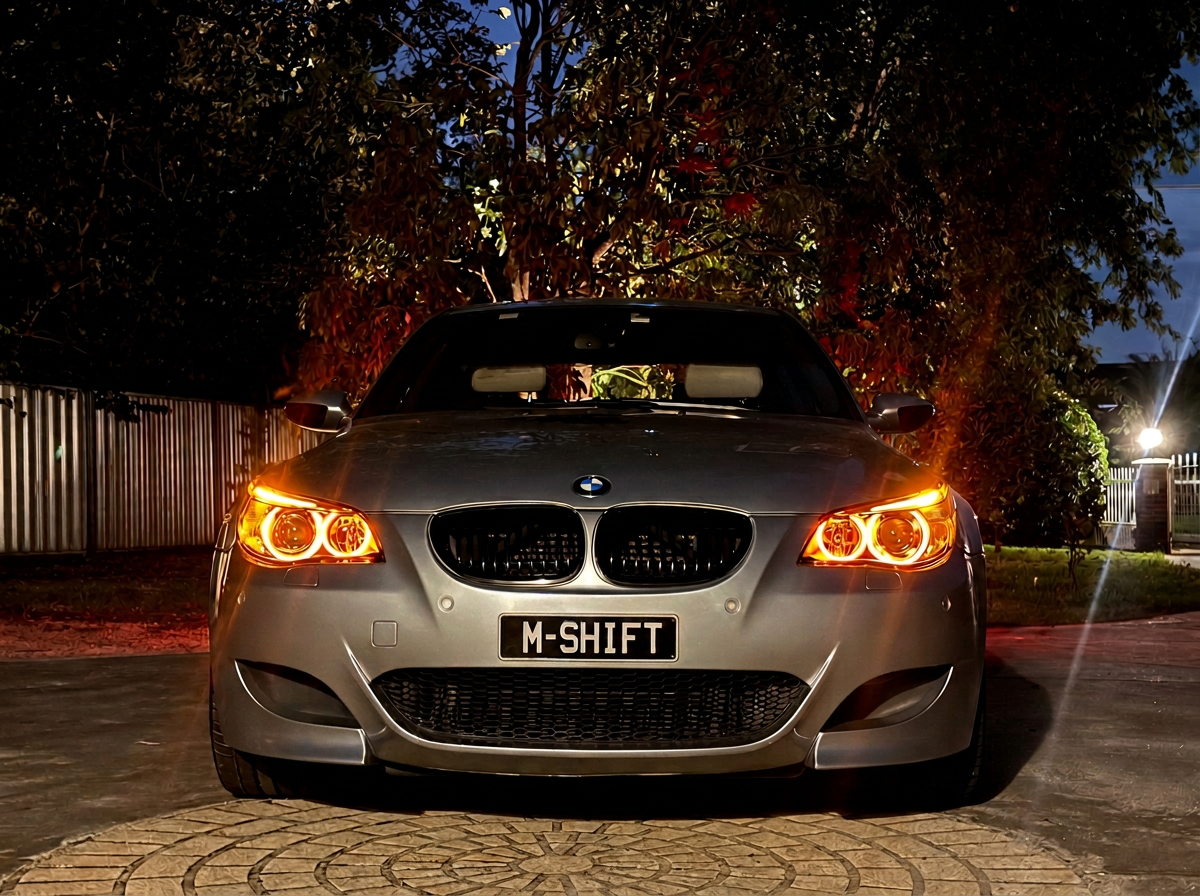
E6X M5 / M6
DME & SMG III Tuning,
Engineered properly.
Purpose-built calibration tools for BMW E60 M5 and E63 M6 owners who care about the details.
A better way to calibrate your M-car.
M-Shift brings DME calibration, SMG shift refinement and SMG III TCU tuning and flashing together in one considered workflow.
It’s so good, even Michael loves it.
What M-Shift does
Tune and flash your MSS65 DME and GDSMG3 TCU all in one place
-
Our flagship SMG enhancement is the result of 18 months of reverse engineering and on-car testing. During development, we benchmarked the F430’s F1 transmission—widely regarded as the pinnacle of single-clutch automated manual systems.
The DME plays a central role in how the SMG executes a shift. M-Shift’s premium enhancement focuses on the low- and mid-speed behaviour that matters in normal driving: reducing lazy shifts, sharpening response, and refining off-throttle downshifts without chasing pointless peak-speed numbers.
-
Read and retain your original DME file, then select the changes that suit your car before preparing a calibrated file in one guided workflow.
Basic tools include VMax delimiter, warm start-up bark, M-Drive default coding, oil-service interval adjustment, stock/599/S65 injector calibration, and selectable engine-speed limits.
For more extensively modified controlled-motorsport or off-road cars, further DME configuration options are available. Premium adds Stage 1 and Stage 2 Power Enhancement calibrations, developed with everyday driveability and SMG behaviour in mind. -
Choose stock Euro SMGIII or M-Shift’s modernised TCU calibration. The modernised tune starts in first gear in D1 and improves low-speed downshift behaviour, with selectable automatic and manual start modes (including memory modes).
-
Have a DCT-swapped M5 or M6? Ultra is now available by private application (POA).
Flash your stock MSS65 hardware with the proprietary MSHFT firmware via OBD using a compatible K+DCAN cable and M-Shift Studio.
Contact info@mshiftengineering.com to discuss pricing
Licence options
Choose the feature set that suits your car. Basic is free and requires no licence. Premium is perpetual and VIN-bound, and includes all Basic DME functionality.
-
For owners who want considered DME options and maintenance-oriented calibration changes.
- VMax delimiter
- Engine start-up bark options
- Oil service interval adjustment
- Injector calibration for stock, 599, or S65 injectors
- Engine speed-limit options
- M-Drive default configuration where supported
- Read, save, prepare, and flash workflow with no licence required
-
Everything in Basic, plus M-Shift’s developed DME and SMG3 tuning features.
- BENIKI’s Shift Moderniser for SMG refinement
- Power Enhancement tune options for suitable vehicle configurations
- SMG III TCU stock Euro or modernised calibration
- Configurable automatic/manual start modes and memory options
Note: A Premium licence includes the Basic DME functionality. Licence availability and feature compatibility are checked against the connected, licensed VIN.
-
Ultra is now available by private application (POA). MSHFT firmware brings native alpha-N operation and DCT integration to supported E6X M5/M6 vehicles, with Manual, SMG and DCT configurations. Ultra includes SMG III TCU tuning. . Contact info@mshiftengineering.com to apply.
Choose your M-Shift package
Basic — DME essentials
Free
Existing Basic DME options and maintenance-oriented calibration changes, available free with no licence required.
Premium — the complete M-Shift package
US$660
Everything in Basic, plus M-Shift’s developed DME and SMG3 tuning features for one VIN.
Ultra — MSHFT firmware
POA — available by private application. Native alpha-N operation and DCT integration for supported E6X M5/M6 vehicles. Ultra includes SMG III TCU tuning.
How it works
Choose your package
Start with free Basic DME essentials, purchase Premium, or apply privately for Ultra. Premium and Ultra are distinct VIN-bound products.
1
Download and install M-Shift
Download and install M-Shift Tuning Studio for Windows. Basic is available immediately; Premium can be activated after purchase. Connect using a suitable K+DCAN interface, then open the application.
2
Activate to your VIN
For Premium or an approved Ultra licence, identify the connected DME, open Licence Activation, enter your purchase/application email, and select your product. VIN assignment happens on connection. Basic requires no activation.
3
Read, configure and flash
Keep stable power and a quality compatible K+DCAN interface connected throughout flashing. For stock DME tuning, read and prepare your calibration first. For Ultra, follow the installation workflow, then customise your tune on the DME screen.
4
FAQ
-
M-Shift is built for BMW E60 M5 and E63/E64 M6 applications using the MSS65 DME and SMG platform. Confirm your vehicle and hardware before purchase.
-
You need a supported quality USB-to-OBD diagnostic interface and a stable vehicle power supply. Do not begin programming work with an unstable battery or unsuitable interface.
The software is designed to run on a PC with 64-bit Windows 10 or Windows 11. -
M-Shift software and calibration options are supplied for controlled motorsport and off-road use. You are responsible for compliance with the laws, emissions requirements, insurance conditions, and regulations that apply to your vehicle and location.
-
The licence is associated with the vehicle VIN, not a single computer. You can reinstall M-Shift Tuning Studio or use another computer and activate again with the purchase email, provided it is the same licensed VIN.
-
At activation, the application shows your available licence tiers and lets you choose which credit to associate with the VIN.
-
Yes. Easily! The tool preserves the original DME read before calibration changes are made. Keep your original files safely and follow the guided workflow.
Alternatively, you can do a full factory restore using in the in-built 0pa+0da files -
Michael is that guy who is so thorough and fickle that if he wasn’t your friend he would be annoying.
Download
Download M-Shift Tuning Studio v17.2.3 for Windows. Basic DME tools are free. Premium and Ultra require their respective VIN-bound licences; Ultra is available by private application.
Studio checks for newer releases when opened with internet access. You can also use Check for Updates. Updates are not installed automatically.
Compatible with 64-bit Windows 10 and Windows 11. A suitable K+DCAN interface is required. The installer is unsigned; Windows may display an unknown-publisher warning.
Contact Us
Questions about compatibility, licences, or getting started? Send us a message.